Total updates instantly as you type each denomination — no submit button needed.
🌍
50+ Currencies
From USD to PKR to NGN — all major world currencies with correct denominations.
📤
Export Anywhere
Download your count as CSV, Excel, or PDF for records, audits, and reports.
🔒
100% Private
All calculations happen in your browser. No data is ever sent to our servers.
📱
Works on All Devices
Fully responsive design works perfectly on desktop, tablet, and mobile.
🆓
Always Free
No registration, no subscription, no hidden fees. Free forever.
What Is a Money Counter Online and How Does It Work?
A money counter online is a free calculator that turns piles of bills and coins into one exact total. You pick a currency, type how many notes or coins you have of each value, and the tool multiplies and adds everything while you type. There is nothing to download, no account to create, and it works as well on a phone as on a laptop.
It is not a counting machine. It cannot see or scan your cash, so you still sort and count by hand. What it removes is the arithmetic, and that is where most counting errors happen. Forgetting to carry a number, multiplying 37 twenties in your head or losing your place in a tall stack are all easy mistakes at the end of a long shift.
The money counter online at the top of this page covers more than 50 currencies and exports every count as CSV, Excel or PDF. The guide below explains how to get accurate results, how bank straps and coin rolls work, how to balance a register, and which of our six tools suits each job.
Quick summary
Choose a currency, enter quantities, and read the total.
Sort cash by value first, and count every pile twice.
A bank strap holds 100 bills, so a strap of twenties is $2,000.
Export each count as a PDF or spreadsheet for your records.
How to Use the Money Counter Online in Four Steps
Choose your currency. The dropdown above the table loads the real notes and coins for that currency, so you never type face values by hand.
Sort your cash. Make one pile for every denomination. Mixed piles are the main cause of wrong totals.
Enter quantities. Type how many notes or coins you hold, not what they are worth. If you have fourteen $20 bills, type 14 on the $20 row and the tool shows $280.
Read the total and export. The amount updates as you type, and it is also written out in words below the figure. When you finish, download the count or press Reset to start the next pile.
Entering quantities has one more advantage. If a total looks wrong, you only recount the row that seems off. You never have to start over.
Why Use a Money Counter Online Instead of Paper?
You can add up cash on paper, and for ten bills that works fine. For a full drawer, however, a money counter online is faster and safer. It removes the repeated multiplication, and it never forgets to carry a number.
Speed. A mixed count of notes and coins takes about a minute instead of ten.
Accuracy. Each row is calculated on its own, so one typo affects one line and not the whole total.
Records. You can export the count and keep it, which paper scribbles rarely allow.
Any currency. The same tool works for dollars, euros, pounds, rupees and many more.
Even confident counters use a money counter online as a second opinion before every deposit, because tired eyes miss digits.
How to Sort and Count Bills Without Mistakes
A money counter online is only as good as the numbers you enter. Cashiers and bank tellers use the same short list of habits, and none of them take long.
Face every bill the same way. Flatten folds and point all the notes in one direction. A torn, taped or oddly sized bill stands out in a neat stack.
Start with the largest value. A slip on the $100 row costs far more than a slip on the $1 row, and you are sharpest at the start.
Count in groups. Setting aside batches of ten or twenty is safer than keeping a running total in your head.
Count twice. A second person is best, counting from scratch rather than checking the first count.
Use weight as a rough check. A US note weighs about one gram, so a hundred notes should weigh close to a hundred grams.
Set aside doubtful notes. Check anything that feels wrong before it goes into the count.
Here is a short example. A drawer holds 4 × $100, 9 × $50, 16 × $20, 11 × $10, 13 × $5 and 34 × $1. That is $400 plus $450 plus $320 plus $110 plus $65 plus $34, for a total of $1,379. You can check any amount of your own by typing the same numbers into the calculator above.
Sort first, then enter the quantity for each row.
Counting Coins and Coin Rolls
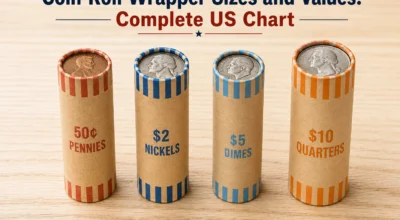
Coins are slower than bills because each one is worth so little. The fix is to stop counting them one at a time. Sort by size, count each type in stacks of ten, and enter the totals. For a jar of mixed change, that usually means four or five stacks instead of hundreds of loose coins.
US coin
Coins per roll
Roll value
Penny
50
$0.50
Nickel
40
$2.00
Dime
50
$5.00
Quarter
40
$10.00
Half dollar
20
$10.00
Dollar coin
25
$25.00
The dime is the smallest US coin even though it is worth more than a penny, so sort carefully. For a full routine, use the coin counter online, read how much a roll of dimes is worth, or see the coin roll wrapper chart. Banks differ on whether they want rolls or accept loose coins, so ask your branch first.
How Much Is a Band, a Strap or a Stack of Cash?
Cash has plenty of names, and not all of them mean the same thing. Banks use exact terms. A strap is a paper band holding 100 bills of one value, and ten straps, or 1,000 notes, are often called a brick.
Bill
One strap (100 bills)
1,000 bills
$1
$100
$1,000
$5
$500
$5,000
$10
$1,000
$10,000
$20
$2,000
$20,000
$50
$5,000
$50,000
$100
$10,000
$100,000
Slang is looser. People often say a “band” or a “stack” for $1,000, and some use “band” for $10,000, so the meaning depends on who is speaking. Banks do not use those words, which is why you should always state the exact number of bills when you order or deposit cash.
For specific amounts, see how many $20 bills make $1,000, how many $50 bills make $1,000 and how many $100 bills make $10,000. Our guide to bank strap sizes covers every value.
A standard strap holds 100 bills of one value.
Counting a Cash Drawer at the End of a Shift
Counting the drawer is only half of closing it. The real question is whether the cash in the drawer matches what the register says it should hold. The method is the same in every shop.
Take everything out of the drawer and sort it by value.
Enter the quantities in the money counter online and note the total.
Subtract the opening float, which is the fixed amount the drawer started with.
Compare what is left with the cash sales on the register report.
Here is an example. The float is $150.00, you count $1,046.50, and the register reports $894.00 in cash sales. The count minus the float is $896.50, so the drawer is $2.50 over. A small difference is normal. What matters is writing it down every time, because repeated gaps point to a process problem such as wrong change, unrecorded refunds or shared access.
The cash drawer count sheet does this comparison for you and gives you a report to print or save. Our step-by-step guide on how to count a cash drawer covers the closing routine, and the article on a cash drawer that is short or over explains the usual causes.
Count the drawer, subtract the float, and compare with the register.
Who Uses a Money Counter Online?
The people who use a money counter online every day have very different jobs, yet they share the same problem: too much cash and too little time.
Shops, cafes and restaurants. Count the float at opening and the till at close.
Market sellers and fundraisers. A cash box with no register still needs an exact total.
Churches, clubs and schools. Collections arrive as mixed bills and coins that two people can check together.
Landlords and small contractors. Cash payments need a record, and an export provides one.
Travellers and households. Count leftover foreign cash before an exchange, or total a savings jar.
If you also pay small bills from a cash box, the petty cash log tracks each payout and keeps a running balance. Parents can also use real coins to teach counting, and our guide on how to count money for kids has a simple plan.
Preparing a Bank Deposit With a Money Counter Online
Banks generally prefer notes that are sorted by value and faced the same way, and many ask for coins in rolls. The rules vary between branches, so ask yours before you go. A short routine saves time at the counter.
Sort the notes by value and face them the same way.
Count each stack and enter the quantities in the money counter online.
Export the count as a PDF and keep it with the deposit slip.
Compare the total with your sales record before you leave.
If the bank finds a different amount, your export shows exactly what you entered and when. For a wider routine, our cash management tips for small businesses explain how to keep a clean daily record.
Counting Large Amounts of Cash Safely
Big piles of cash call for a few extra habits. Count in a private, well-lit place, and keep a second person nearby if the amount is large. Never leave counted cash unattended, and write the total down before you move it. If the count is for a business, keep the exported file with the deposit slip.
In the United States, banks report cash deposits and withdrawals of more than $10,000, and a business that receives more than $10,000 in cash in one transaction, or in related transactions, generally has to file IRS Form 8300. The IRS explains the rules on its Form 8300 page. These rules are about clear records, not about suspicion. One point matters, though: never split a deposit into smaller amounts to avoid a report. That practice is illegal even when the money is legitimate. Your bank or accountant can tell you what applies to you.
Which MoneyCounter Tool Should You Use?
MoneyCounter has six calculators, and each handles a different job. This table points you to the right one.
Notes and coins differ from one country to the next, so a money counter online that assumes dollars is no use if you hold something else. The dropdown loads the right values for more than 50 currencies. For the ten currencies people ask about most, there is also a dedicated page with a local denomination guide:
The calculator totals one currency at a time. If you hold two, count them separately and export each count.
What to Do With Your Export
Every count can be saved as a CSV, Excel or PDF file, and each file has a different strength. A PDF is best for a signed record, because it looks the same on every device. An Excel or CSV file is better when you want to add up several counts, such as a week of closing totals. Each export includes the date, the currency, every denomination, the quantities and the grand total.
A simple habit makes exports far more useful. Name each file with the date and the place, for example the shop name and the day. Then store them in one folder, so a missing total takes seconds to find instead of an afternoon of searching.
Common Cash Counting Mistakes
Entering amounts instead of quantities. The tool does the multiplying, so type the number of bills or coins.
Counting from a mixed pile. Sort by value first, every time.
Skipping the second count. A fast recount of the biggest piles catches most slips.
Forgetting the float. A drawer total means little until you subtract the opening amount.
Mixing currencies. Several countries share the dollar sign, so check the notes, not the symbol.
Ignoring small differences. One short day is fine, but a pattern deserves a closer look.
Accuracy, Privacy and Keeping Records
The money counter online does its arithmetic exactly, so the total depends only on the quantities you type. It also cannot tell you whether a note is genuine. If something feels wrong, read our guide on how to identify counterfeit money, and see the security features of each note on uscurrency.gov.
The count is calculated in your browser, and the amounts you type are not sent to our servers. Like most sites, we may use cookies for analytics and advertising, and our privacy policy has the details.
If you count cash for a business, keep your exports. A dated PDF or spreadsheet is a simple record that supports your books. The IRS explains how long to keep business records, and our cash management tips for small businesses show how to build a simple daily routine. For more guides, browse the MoneyCounter blog.
FAQ
Frequently Asked Questions
How do I count money by denomination?
+
To count money by denomination: (1) Sort all bills and coins into separate piles by face value. (2) Count how many bills or coins are in each pile. (3) Enter the quantities into our calculator above. (4) The total updates automatically in real time. You can then export your count as PDF or Excel.
How many $20 bills make $1,000?
+
It takes exactly 50 twenty-dollar bills ($20 × 50 = $1,000) to make one thousand dollars. A standard US bank strap of $20 bills contains 100 bills, totaling $2,000. Use our Denomination Breakdown Calculator to find how many bills of any denomination make any amount.
How do I count a cash drawer at end of shift?
+
To count a cash drawer: (1) Remove all bills and coins from the drawer. (2) Sort them by denomination. (3) Use our Cash Drawer Count Sheet tool to enter quantities for each denomination. (4) The tool calculates total cash and compares it with your expected amount. (5) Print or download the reconciliation report.
Does this money counter work for Pakistani Rupee (PKR)?
+
Yes! Select PKR from the currency dropdown and the calculator will show all Pakistani Rupee denominations: ₨5,000, ₨1,000, ₨500, ₨100, ₨50, ₨20, ₨10, ₨5, ₨2, and ₨1. Visit our dedicated PKR Money Counter page for a complete guide to Pakistani Rupee notes.
Can I export my cash count to Excel or PDF?
+
Yes! After entering your cash count, click the CSV, Excel, or PDF buttons below the calculator. Your export will include the date, currency, denomination breakdown, quantities, and grand total — ready for record-keeping, audits, or financial reports.
Is this money counter calculator free?
+
Yes, MoneyCounter.site is completely free to use with no registration required. All tools — Money Counter, Cash Drawer Count Sheet, Coin Counter, Denomination Breakdown, Change Calculator, and Petty Cash Log — are free forever.
Learn More
Cash Management Guides
Tips, guides, and best practices for counting and managing cash.